
The Quick Take: Have you ever read a clean, five-point AI summary of a complex 30-page report, felt like you completely understood it, and then two hours later in a team meeting realized you couldn’t recall a single core detail? Easy reading creates an illusion of competence. If you want to know how to work on focus and build lasting retention in the age of AI, here are three simple, physical desk exercises to keep your problem-solving mind sharp.
1. The Afternoon Meeting Blank-Out
Picture this:
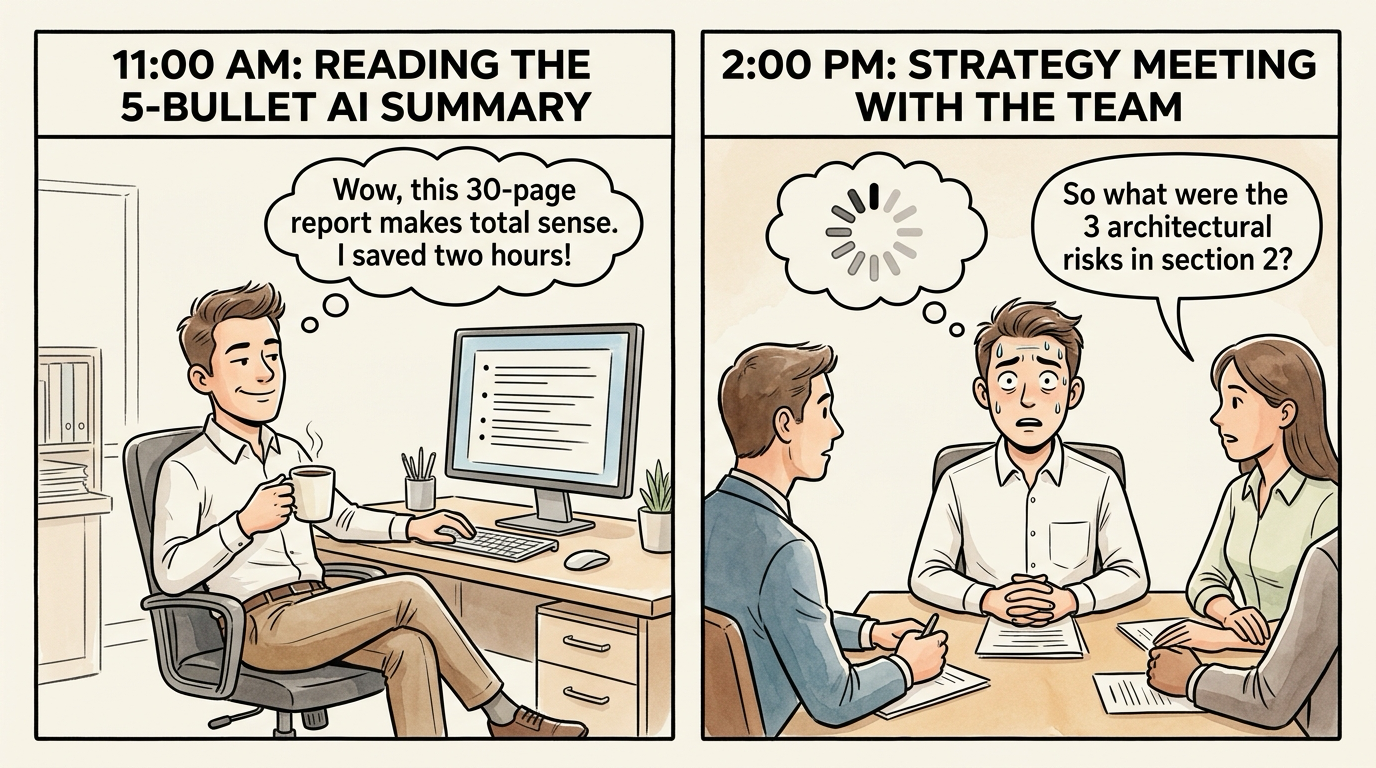
It’s 11:00 AM. You have an important strategy meeting at 2:00 PM to discuss a dense 40-page technical specification or industry report. Because your calendar is packed with back-to-back calls, you do what almost every smart professional does today: you drop the document into an AI tool and ask for a 5-bullet executive summary.
Thirty seconds later, the screen serves up a masterpiece. Clean headers. Flawless grammar. Key takeaways numbered 1 through 5.
You skim through it with a warm cup of coffee in hand, nodding your head. “Got it. Makes total sense. This saved me two hours.”
Fast-forward to 2:20 PM. You’re sitting in the meeting. Your director turns to you and asks:
“Ray, looking at the architectural dependencies in section three, what are the two main failure modes we need to budget for?”
You freeze.
You know you read the summary. You remember that nice, tidy bullet list. But when you try to reach into your mental filing cabinet to grab the actual details, your hands come back completely empty. A cold wave of panic hits your chest. You scramble to reopen the chat window under your desk, mumbling something vague to buy time.
What happened? You didn’t zone out. You weren’t hungover. You read every single word on that screen.
Yet two hours later, that information vanished as if it were written on wet sand.
2. Why This Happens: The “Fluency Illusion” and the Cost of Easy Answers
First, let’s settle one truth right away: your memory isn’t broken.
What you experienced is a well-documented mental trap known as the Fluency Illusion.
Think of your brain like a muscle at the gym. When you lift a heavy dumbbell, the physical strain and micro-tears in the muscle fibers are the exact signal that tells your body to build new muscle. If you hire someone else to lift the dumbbell while you sit on a bench and watch them sweat, it looks easy. It feels satisfying. But your own biceps won’t grow an ounce.
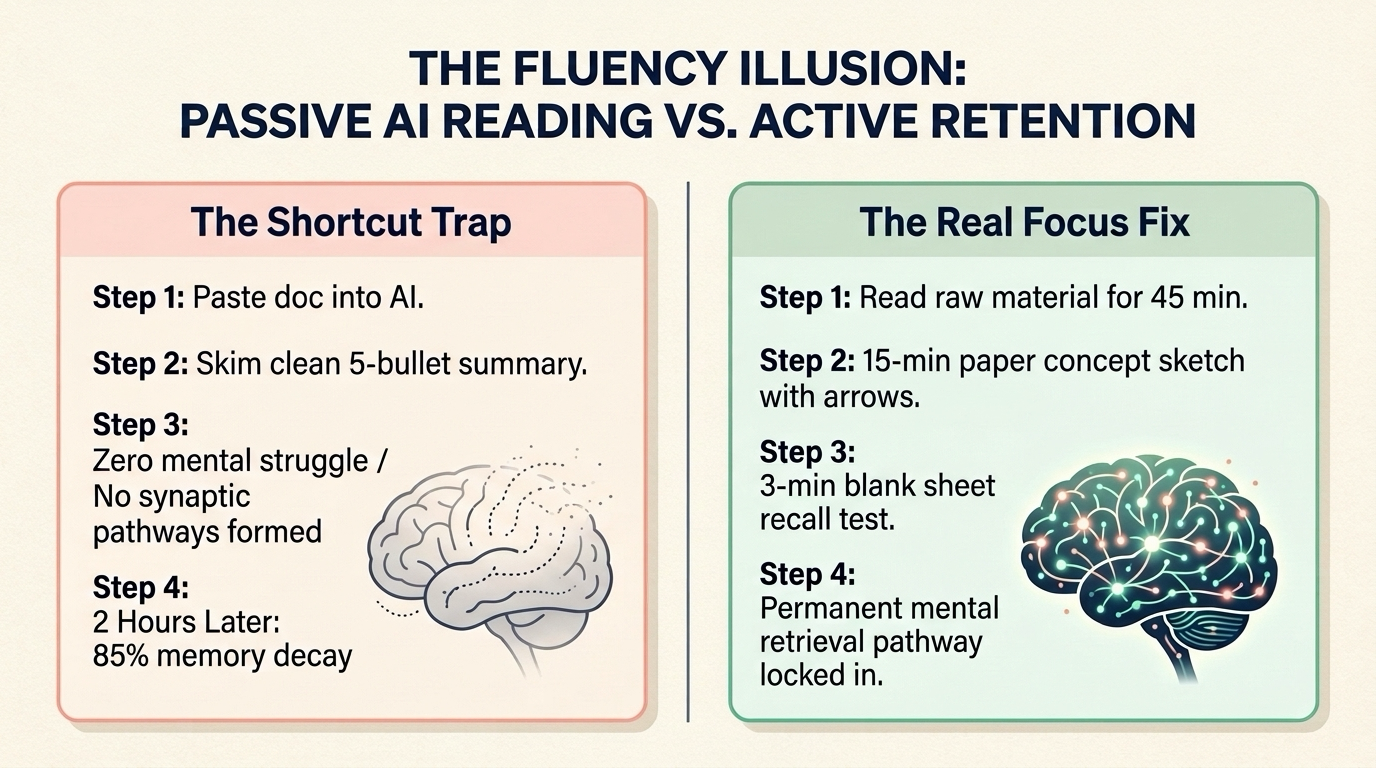
When you read a raw, messy document yourself, your brain has to do real cognitive heavy lifting:
- It filters out irrelevant filler.
- It struggles to connect new ideas to things you already know.
- It resolves contradictions and organizes concepts into an internal mental model.
That subtle feeling of mental friction—the slight squint of your eyes, the scratch of a pen on paper, the pause to ask yourself “wait, how does X relate to Y?”—is the biological trigger that commands your brain to encode information into long-term memory.
When you feed that raw document to an AI tool, the software does 100% of the cognitive heavy lifting for you.
The AI organizes the chaos, identifies the patterns, and hands you a pre-chewed, perfectly digested smoothie of bullet points. Because the text is so clear and easy to read, your brain mistakes that ease of reading for true understanding.
In the moment, you feel like an expert. But because your brain never had to struggle to organize the information, it never built a single neural retrieval pathway. The moment you close the tab, the information evaporates.
If you do this for months on end, your independent concentration weakens. Your working memory—the mental scratchpad you use to solve complex problems—begins to atrophy.
So how to work on focus when software tempts you to outsource your thinking on every tab? You don’t need to throw your computer into a lake. You just need three practical desk exercises to rebuild your mental stamina.
3. The Fix: 3 Practical Desk Cognition Exercises to Rebuild Real Focus
Concentration is not a mystical character trait you’re born with; it’s a physical muscle you train with daily habits.
If you want to strengthen your cognition focus and retain complex information without feeling overwhelmed, integrate these three simple cognition exercise routines into your regular workday:
Exercise 1: “Think First, AI Second” (The 5-Minute Brain Draft)
The single biggest mistake desk workers make with modern generative tools is opening them before they’ve had a single thought of their own.
When you prompt an AI with a blank slate—“Give me a strategy outline for X”—its generated structure immediately anchors your perspective. You lose the unique architectural insights and intuitive edge that only you bring to the table.
The Protocol:
- Keep ChatGPT, Claude, and your inbox closed.
- Grab a physical sheet of paper and a black pen.
- Set a timer for 5 minutes.
- Force your brain to vomit out 3 core points: What is the real problem? What are two messy constraints? What is my gut recommendation?
- Only after you have your rough paper draft do you open your AI assistant. Prompt it with your notes: “Here is my rough 3-point strategy draft. Critique its weak assumptions and suggest two alternative perspectives.”
By forcing your brain to draft first, you keep your independent problem-solving sharp while using software as a sparring partner rather than an intellectual crutch.
Exercise 2: Visual Note Taking (The 15-Minute Concept Map)
Most people take notes the same way they were taught in elementary school: typing linear, top-to-bottom bulleted lists.
The problem? The human brain does not store memories in alphabetical or bulleted hierarchies. Memory is inherently spatial and relational. When you write bullet points, you treat every item as an isolated fact. Within three weeks, 80% of those facts decay.
Visual note taking and concept mapping note taking solve this by forcing your brain to map how concepts connect in space.
The Protocol:
- Instead of opening a digital text editor, draw three to five core ideas as boxes across a blank sheet of paper.
- Draw connecting arrows between the boxes.
- On top of each arrow, write one active verb explaining the relationship (e.g., “triggers”, “bottlenecks”, “competes with”, “depends on”).
- Identify the central tradeoff. Circle it in red.
When you turn dense specs into a relational concept map, you engage both verbal and visual processing centers. Studies in learning retention show that visual concept maps cut memory decay by up to 70% compared to traditional linear note-taking.
Exercise 3: The Blank Sheet Test (Active Recall Over Passive Re-reading)
When professionals want to remember something for a presentation or certification, their default instinct is passive re-reading: highlighting passages, scrolling through summaries, or skimming slides.
Learning scientists have proved repeatedly that passive re-reading is almost completely useless for long-term retention.
The gold standard for durable memory is active recall studying—forcing your brain to pull information out of memory rather than trying to cram it back in.
The Protocol:
- Spend 45 to 60 minutes reading a technical document, whitepaper, or report.
- Close your laptop screen or push the papers face down.
- Take a blank sheet of paper and spend 180 seconds writing down the 3 biggest ideas you can remember, without looking.
- If you get stuck after 30 seconds, don’t panic. That uncomfortable pause—where your brain searches through the dark—is the exact moment neural pathways are fortified.
- Once your 3 minutes are up, open the document again. Look only at the gaps you missed.
Running this simple 3-minute active recall drill just once after reading locks in more lasting memory than re-reading the entire document three times.
4. How to Adapt This for Your Workday (The 3 Personas)
Depending on your daily responsibilities, here is how to apply these cognition exercises without disrupting your workflow:
Evaluating Strategy Without Mental Abdication
The Trap: Relying on AI summaries of vendor proposals and team updates, leaving you flat-footed when stakeholders question the underlying logic in boardroom meetings.
Your Move: Apply the 5-Minute Brain Draft. Before reading any summary, write down your top 2 business risks on paper. Then scan the document specifically to see if those risks were addressed.
Retaining Architectural Models & Complex Specs
The Trap: Pasting stack traces, API docs, or cloud specs into AI and copy-pasting the output—feeling productive until an outage forces you to debug the system from memory.
Your Move: Use Visual Concept Mapping. Spend 10 minutes sketching service boundaries, data flows, and failure states on paper before writing a line of code or prompting an assistant.
Absorbing Dense Research & Professional Certifications
The Trap: Re-reading dense academic papers, legal briefings, or exam prep guides for 4 hours straight, confusing recognition with genuine recall.
Your Move: Practice Active Recall with the Blank Sheet Test after every 50-minute reading sprint. If you can’t sketch the core thesis on paper from memory, you haven’t learned it yet.
5. Find Your Focus Profile: The 60-Second Cognitive Diagnostic
Every person’s focus leaks in different ways. Some professionals struggle with starting friction, while others get derailed by mental tab clutter, rapid context-switching, or over-reliance on digital shortcuts.
To discover your personal cognitive focus archetype—and get a tailored daily workflow blueprint to protect your attention:
6. Frequently Asked Questions
Why does reading an AI summary feel so clear if I won’t remember it?
This is the “Fluency Illusion.” When text is neatly structured and grammatically effortless, your brain interprets the ease of processing as mastery. But because your working memory never struggled to synthesize the points itself, it never stored them in permanent memory.
How often should I practice these cognition exercises?
You don’t need dedicated study hours. Simply weave them into your regular workday: do a 5-minute solo draft before starting a major email or proposal, and run the 3-minute blank sheet recall test whenever you finish reading a dense report.
Can visual note taking help if I’m not good at drawing?
Yes. Visual concept mapping has nothing to do with artistic talent. It uses simple geometric boxes, connecting lines, and action verbs to visualize relationships. The power comes from spatial organization, not artistic illustration.
Is AI bad for human memory in general?
No. AI is an exceptional research assistant, proofreader, and brainstorming partner. The danger occurs when we use it as an intellectual replacement—letting software do the synthesis before our own brain has formed an initial mental model.
🎁 Next Step: Reclaim Your Daily Deep Work Window
Ready to put these cognition exercises into practice alongside focused professionals?
- 👉 Take the 60-Second Focus Diagnostic to identify your primary focus leaks and receive your personalized recovery playbook.
- 👉 Join a Live 50/10 Sprint in the Deep Work Room to experience uninterrupted, distraction-free coworking with zero meetings and zero noise.